
How to Track Prices on Amazon in 2026
Amazon still changes prices constantly. In 2026, that hasn’t slowed down — if anything, flash deals, lightning offers, and seller swaps make it easier than ever to overpay without noticing.
If you’ve ever bought something and seen it cheaper a week later, this guide is for you. Here’s how to track Amazon prices properly in 2026, without refreshing product pages all day.
Why Amazon price tracking still matters
Amazon’s “deal” labels are marketing, not proof. A crossed-out list price can look huge while the actual selling price barely moved.
Price tracking helps you answer three questions before you buy:
- Is this low for this product? (price history)
- Will I know when it drops? (alerts)
- Is the offer from a seller I trust? (Amazon vs third-party)
Without those answers, you’re guessing.
What’s different about Amazon shopping in 2026
A few patterns are especially useful to know this year:
- More short-lived drops. Many discounts last hours, not days. Manual checking misses most of them.
- Seller changes mid-deal. The buy box can flip between Amazon and third-party sellers at different prices and shipping terms.
- Coupon stacking is quieter. Coupons and Subscribe & Save still matter, but they’re easy to overlook if you’re only watching the headline price.
- Fake urgency is louder. Countdown timers and “was” prices are more common — history charts cut through the noise.
Method 1: Use Amazon’s built-in tools (good for light tracking)
Wish lists and “Save for later”
Add items to a wish list or Save for later. Amazon sometimes shows a small price-drop hint, but notifications are inconsistent. Treat this as a reminder list, not a real tracking system.
Follow the product / deal pages
Useful for browsing, weak for precision. You still need to visit often, and you won’t get a clean answer to “is this the lowest in 90 days?”
Best for: a handful of items you’re casually watching.
Not ideal for: anything you’re waiting to buy at the right price.
Method 2: Check price history before you buy
Before tapping Buy Now, look at recent price history. Ask:
- Has this ASIN been cheaper in the last 1–3 months?
- Is today’s “discount” just a return to the normal price?
- Do big drops cluster around Prime Day, Black Friday, or end-of-month clears?
Tools that show charts make this fast. Apps like Reprice include Amazon price history so you can judge a deal in seconds instead of trusting the strikethrough.
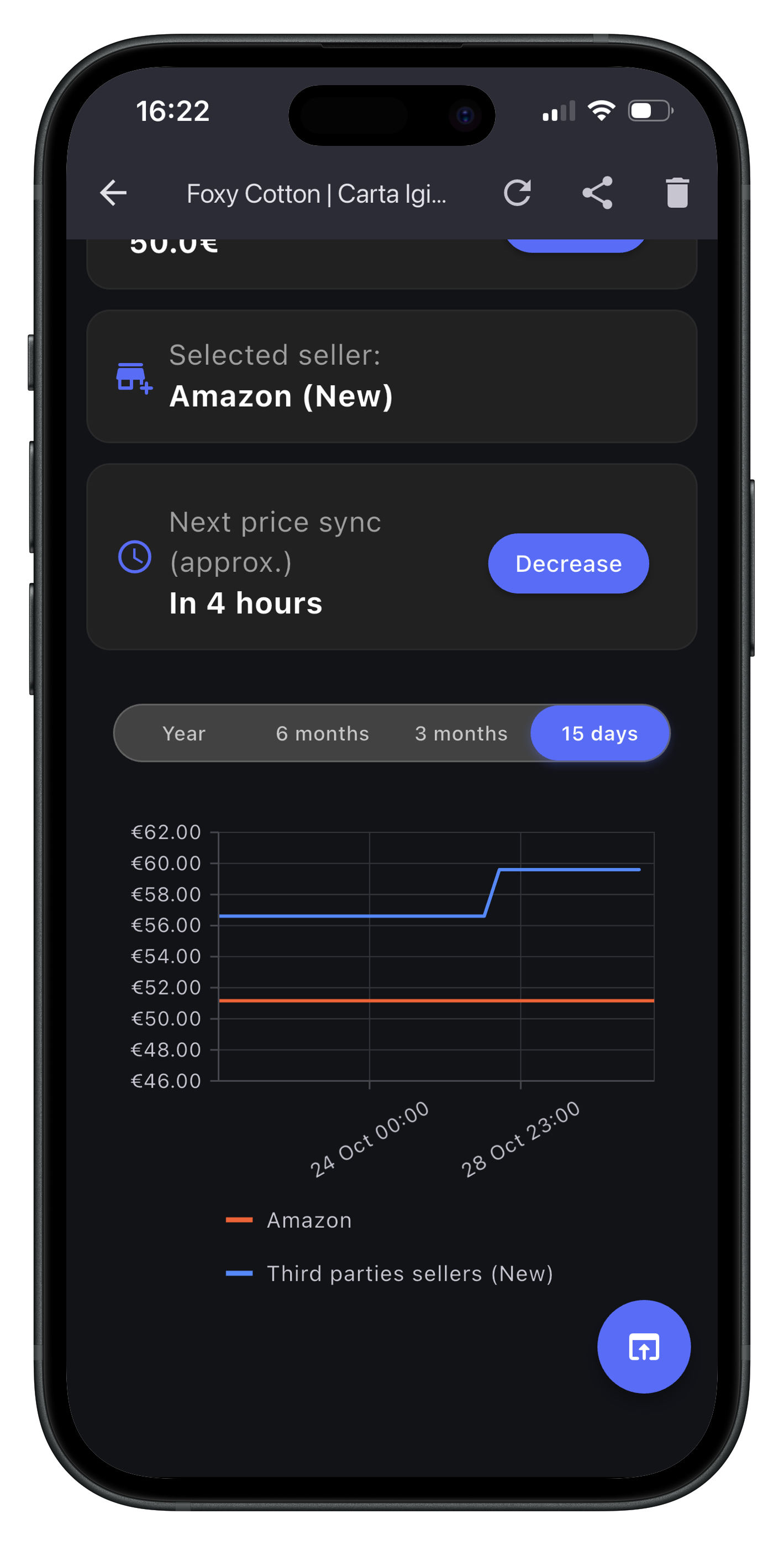
Method 3: Set target-price alerts (the method that actually saves money)
The most reliable workflow in 2026:
- Find the product (or paste the Amazon URL).
- Note a realistic target — often 10–20% below today’s price, not a fantasy number.
- Get notified when the price hits that target.
- Buy quickly when the alert lands.
This is where dedicated trackers help most. With Reprice, for example, you can track an Amazon product from your phone, set a threshold, and get notified when the price drops under it — including options to prefer Amazon as the seller when that matters to you.
A simple Amazon tracking workflow for 2026
Use this checklist for anything over ~€30 / $30:
- Search and shortlist 1–2 ASINs you’re actually willing to buy.
- Open price history and skip anything that isn’t near a recent low.
- Set an alert slightly below today’s price (or at the recent low).
- Ignore fake urgency until the alert fires.
- Confirm seller, shipping, and returns before you check out.
Do this for a small wishlist — headphones, a vacuum, a desk chair — and you’ll feel the difference within a few weeks.
Common mistakes to avoid
- Chasing the absolute lowest ever. Some lows never return. A solid recent low is usually enough.
- Ignoring total cost. Shipping, import fees, and slower delivery can wipe out a “win.”
- Trusting only the deal badge. History beats badges.
- Tracking too many items. Start with 5–10 products you’ll buy soon. Noise kills the habit.
- Waiting forever. If your target never hits after months, raise it a bit or buy a comparable model.
Manual tracking vs an app
| Approach | Pros | Cons |
|---|---|---|
| Wish lists / bookmarks | Free, simple | Easy to forget, weak alerts |
| Price history websites | Great research | Still requires checking often |
| Price tracking app | Alerts + history in one place | Needs a short setup |
If you only buy a couple of Amazon items a year, manual methods can work. If you shop regularly, an app pays for itself in one avoided overpay.
Soft recommendation: when Reprice fits
Reprice isn’t the only way to track Amazon prices — but it’s built for this exact job: watch a product, see whether the current price is fair, and get notified when it drops.
It’s a good fit if you want:
- Amazon price history charts before you buy
- Alerts when a product falls under your target
- Tracking from your phone without babysitting tabs
- Optional seller-aware notifications on Amazon deals
You can try Reprice free and add the items already sitting in your Amazon cart or wish list.
Bottom line
In 2026, tracking Amazon prices well means three habits: check history, set realistic alerts, and ignore marketing until the data agrees.
Start with a few products you’re going to buy anyway. Once you’ve saved on even one of them, the workflow sticks — and you stop paying full price by accident.
Ready to Start Saving?
Join smart shoppers using Reprice to track prices across Amazon and other stores — and never overpay by accident.
Get Reprice Free